Launching a mobile game in 45 days is possible when the project has a focused concept, limited features, ready assets, and a clear Mobile Game Development plan.
The goal is not to build a large game in less time. It is to create a playable mobile game MVP, test it with real users, prepare the store listing, and release a focused first version within 45 days.
Working with an experienced Mobile Game Development Company can help keep the scope, development timeline, testing, and launch process organized from the beginning.
It also makes it easier to understand the Game Development cost before development starts and avoid unnecessary features that can increase the budget.
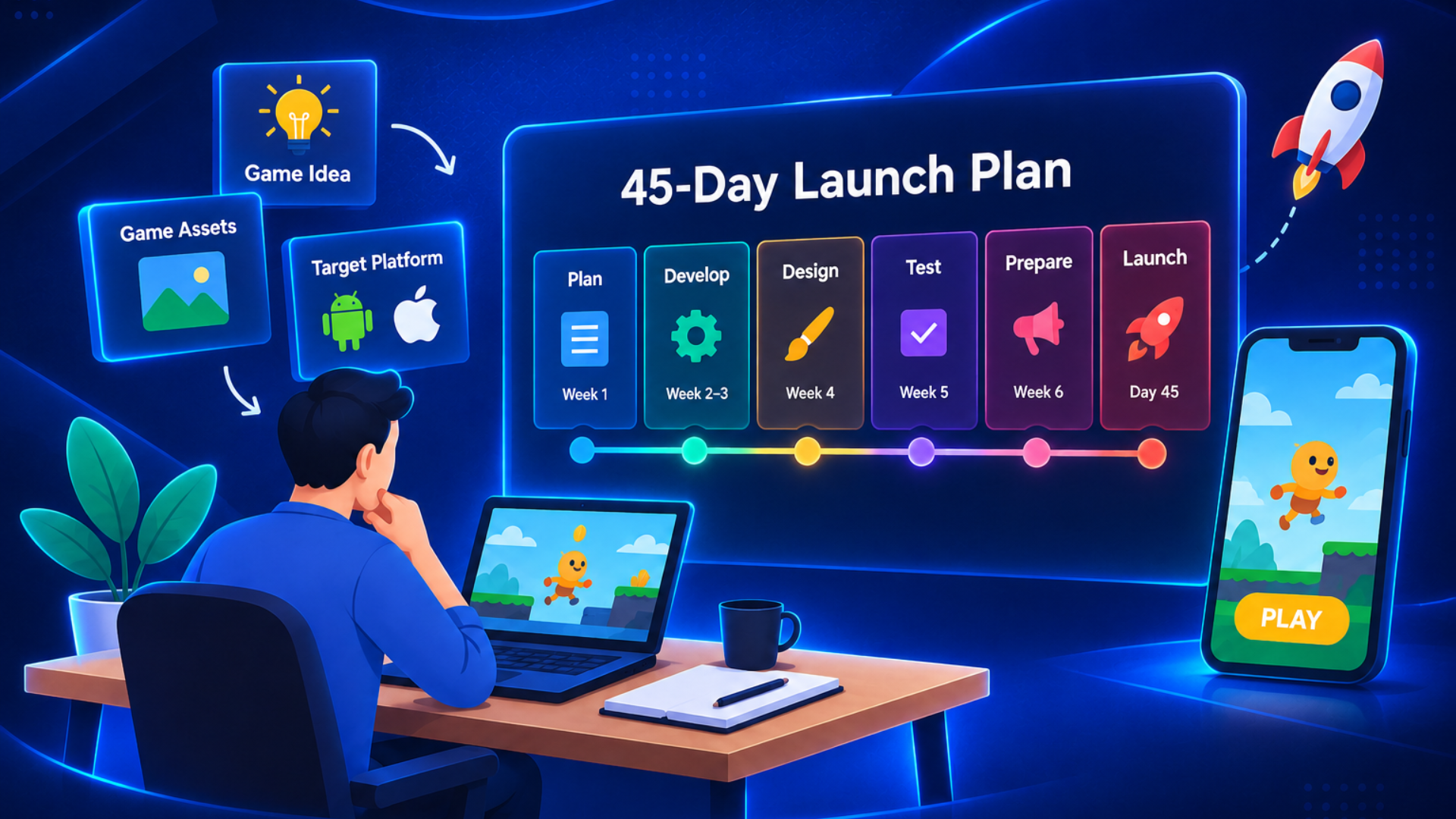
A realistic 45-day plan usually follows this path:
- Days 1–5: Game idea, scope, platform, and planning
- Days 6–12: Prototype and core gameplay
- Days 13–22: Main development and levels
- Days 23–30: UI, art, audio, and monetization
- Days 31–37: Testing and bug fixing
- Days 38–42: Beta testing and store preparation
- Days 43–45: Final checks and launch
The exact timeline depends on the game's complexity, team size, platform, assets, backend requirements, and store requirements.
Can You Launch a Mobile Game in 45 Days?
Yes, a small and focused mobile game can be launched in 45 days. The timeline becomes difficult when the project includes complex multiplayer systems, large worlds, advanced 3D art, extensive content, or custom backend features.
Is 45 Days Realistic?
A 45-day mobile game development timeline is realistic when the project starts with a clear scope and a limited number of features.
A faster development cycle usually includes:
- One main gameplay loop
- A small number of levels
- Ready-made or prepared art assets
- A focused development team
- Limited platforms at launch
- Testing throughout development
The goal should be a polished first version rather than a feature-heavy game that is rushed to release.
What Type of Game Fits?
Some mobile game concepts are easier to develop within a short timeline because they can depends on a simple gameplay loop.
Suitable examples include:
- Puzzle games
- Hyper-casual games
- Endless runners
- Tap-based arcade games
- Simple card or quiz games
- Small single-player games
Games with complex multiplayer, large open worlds, advanced AI, or extensive live-service systems generally need more development time.
What Slows Development?
The biggest delays often come from scope changes and dependencies outside coding.
Common causes include:
- Adding new features during development
- Waiting for unfinished art or audio
- Changing the game concept midway
- Discovering major bugs late
- Supporting too many devices
- Delaying store preparation
Locking the scope early allows the team to spend more time building and testing instead of repeatedly changing the project.
What Can Be Skipped?
A fast first release does not need every possible feature.
Depending on the game, the first version may postpone:
- Multiplayer modes
- Chat systems
- Large in-game stores
- Multiple languages
- Complex cutscenes
- Advanced social features
- Large content libraries
These features can be introduced through later updates after the first release provides real player feedback.
When Is 45 Days Enough?
Forty-five days can be enough when several conditions are already in place:
- The game concept is clearly defined
- The core gameplay is simple
- The team has relevant experience
- Art and audio requirements are manageable
- Development tools are ready
- Testing starts early
- The launch scope is fixed
If the project needs large custom technology or content, a longer mobile game development time should be expected.
How to Plan a Mobile Game for a 45-Day Launch
A successful 45-day launch starts before development begins. The team needs to know what it is building, who it is building for, and what must be ready on launch day.
Define the Game Scope
Start by defining the smallest version of the game that can deliver the player experience.
Focus on:
- One core gameplay loop
- Must-have features
- Target audience
- Initial level count
- Monetization approach
- Launch platform
Move non-essential ideas into a post-launch feature list instead of adding them to the first build.
Choose the Right Platform
The platform affects development, testing, store preparation, and release requirements.
Decide whether the first release will target:
- Android
- iOS
- Android and iOS
Launching on one platform first can reduce testing requirements and simplify the initial release. If both platforms are required, plan the shared development work and platform-specific testing from the beginning.
Create a Development Plan
A mobile game development roadmap should divide the 45 days into measurable milestones.
A practical plan could include:
- Week 1: Planning and prototype
- Week 2: Core gameplay
- Week 3: Main features and levels
- Week 4: UI, art, audio, and monetization
- Week 5: QA and optimization
- Week 6: Beta testing and store preparation
- Final days: Submission and launch
Each task should have one clear owner and a defined completion point.
Prepare Game Assets
Asset preparation can become a major bottleneck if it starts too late.
Prepare:
- Characters and environments
- UI elements
- Animations
- Sound effects
- Music
- App icon
- Screenshots
- Promotional visuals
- Store description
Using an agreed visual style and organized asset files can reduce unnecessary revisions during development.
Set Launch Milestones
Break the deadline into smaller checkpoints rather than waiting until day 45 to evaluate progress.
For example:
| Milestone | Target |
| Game concept and scope | Day 5 |
| Playable prototype | Day 12 |
| Core gameplay complete | Day 22 |
| Feature-complete build | Day 30 |
| QA and optimization | Day 37 |
| Beta testing | Days 38–42 |
| Final submission and launch | Days 43–45 |
These milestones make it easier to identify delays while there is still time to correct them.
What Features Can You Build in 45 Days?
A focused team can build a playable mobile game MVP within 45 days when the scope is controlled. The exact feature set depends on the game type and the amount of existing content and technology available.
What Can Be Built in 45 Days?
A small first release can include:
- One core gameplay loop
- Basic menus and settings
- A limited number of levels
- Player progression
- Simple rewards
- Basic monetization
- Analytics and crash reporting
The objective is to create a complete player journey from opening the game to completing gameplay and returning for another session.
Core Gameplay
Core gameplay should receive the highest priority because it determines whether the game is enjoyable.
It may include:
- Player movement and controls
- Touch interactions
- Scoring or win conditions
- Basic enemies or obstacles
- Rewards and progression
Build and test the core loop before spending too much time on secondary features.
Game UI and Menus
A simple interface can make a small game feel complete without requiring a large design system.
Consider:
- Home screen
- Gameplay HUD
- Pause screen
- Settings
- Tutorial prompts
- Results screen
- Reward screens
The UI should be easy to understand on different mobile screen sizes.
Levels and Progression
The number of levels should match the available development time.
A first release might use:
- A small number of polished levels
- Gradually increasing difficulty
- Score or star targets
- Unlockable content
- Saved progress
Quality is more important than filling the game with unfinished levels.
Monetization Features
Monetization can be included in the MVP when it fits naturally with the game.
Possible options include:
- Rewarded ads
- Interstitial ads
- In-app purchases
- Virtual currency
- Ad-free upgrades
The monetization model should be planned early because payment flows, ads, store configuration, and testing can affect the development schedule.
What Is the Cost of Developing a Mobile Game?
A 45-day project does not have one fixed mobile game development cost. The budget depends on the game's scope, art style, platform, team, features, backend requirements, and testing needs.
A short timeline does not automatically mean a low budget. Compressing development may require a focused team working across development, art, design, and QA at the same time.
How Much Does It Cost?
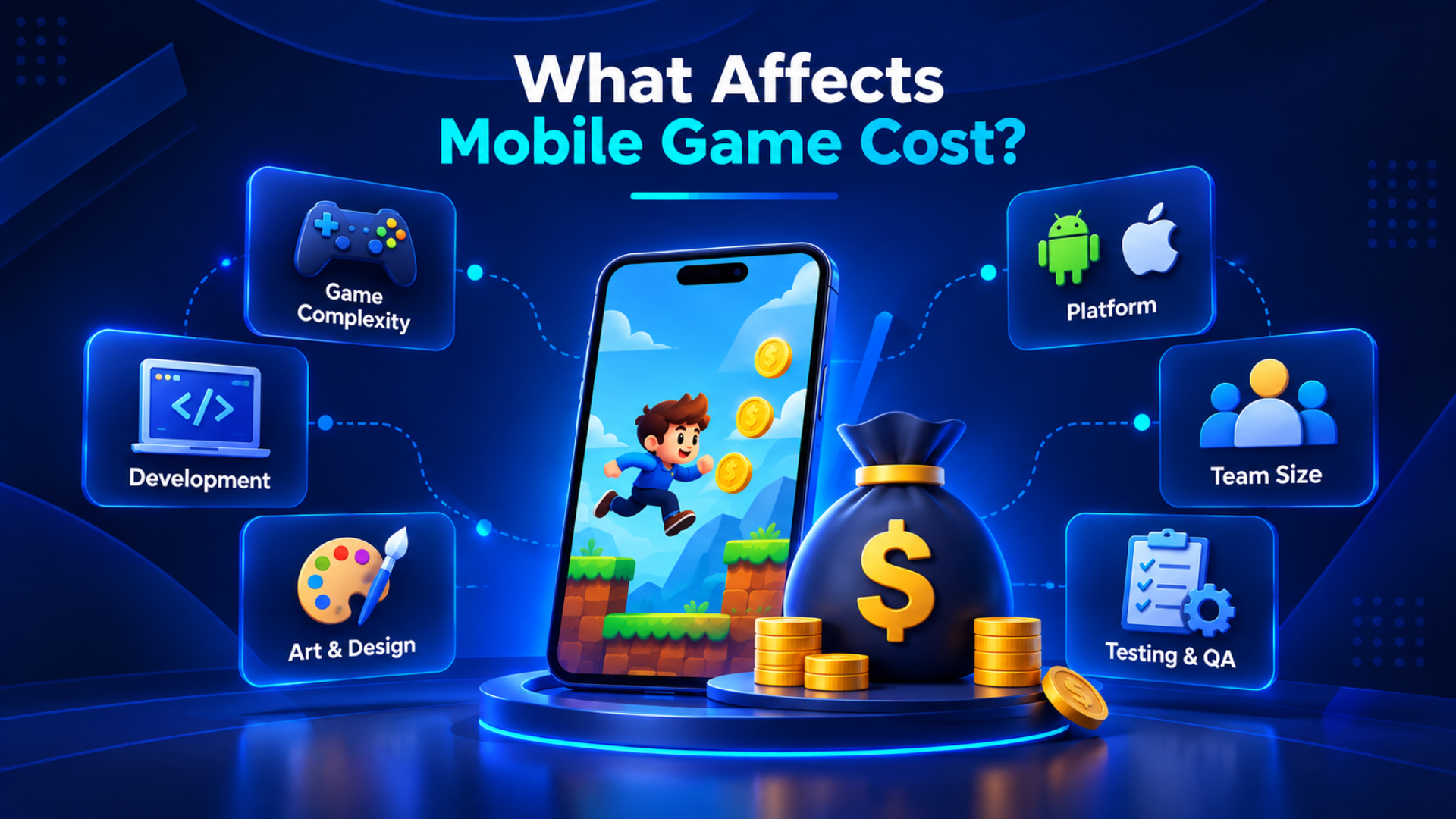
The main cost factors include:
- Game type and complexity
- Number of platforms
- Team size
- Development hours
- Art and animation requirements
- Backend requirements
- Monetization
- Testing
- Post-launch support
A simple 2D game with limited content can require substantially less work than a feature-rich 3D game.
Development Cost
Development covers the systems that make the game playable.
Typical work includes:
- Game mechanics
- Controls
- Level systems
- UI implementation
- Save and progression systems
- Backend integration
- Ads and in-app purchases
- Analytics
- Platform integration
More systems mean more development hours, so removing unnecessary features is one of the most effective ways to control the budget.
Art and Design Cost
Art requirements can significantly change the budget.
The scope may include:
- Character design
- Environment art
- 2D or 3D assets
- Animation
- VFX
- UI/UX
- Icons
- Promotional graphics
A simple 2D visual style generally requires a different production effort from a highly detailed 3D game with custom characters, environments, and animations.
Testing and QA Cost
Testing should be part of the budget from the beginning rather than treated as a final task.
QA may cover:
- Gameplay testing
- Device compatibility
- Performance
- Memory usage
- Crash testing
- Ads and payments
- Save systems
- Store build validation
Testing throughout development reduces the risk of discovering major problems immediately before launch.
Post-Launch Costs
The budget continues beyond the game's release on the store.
Post-launch expenses may include:
- Bug fixes
- Updates
- New levels
- Server or hosting costs
- Analytics
- Player support
- Marketing
- Live events
Planning a post-launch budget helps keep the game supported, updated, and maintained after its initial release.
How to Test a Mobile Game Before Launch
Testing should happen throughout mobile game development, not only during the final few days.
Apple recommends thorough testing before distribution, while Google Play provides internal, closed, and open testing options before production release.
How Do You Test a Mobile Game?
Start with a structured testing process.
A basic workflow is:
- Define what needs to be tested.
- Test each major feature.
- Record bugs clearly.
- Prioritize critical problems.
- Fix and retest.
- Repeat until the build is stable.
This approach helps the team identify problems before they affect the public launch.
Test Core Gameplay
Core gameplay should be tested repeatedly because even small problems can affect the entire player experience.
Check:
- Controls and touch response
- Difficulty progression
- Rewards
- Level completion
- Save and load behavior
- Tutorials
- Game restart behavior
Test both normal and unusual player actions to find problems that may not appear during standard play.
Check Device Compatibility
Mobile users have different devices, screen sizes, operating system versions, and hardware capabilities.
Test across:
- Low-end devices
- Mid-range devices
- High-end devices
- Different screen sizes
- Supported Android versions
- Supported iOS versions
Performance checks should also cover loading times, frame rate, memory usage, battery consumption, and overheating.
Fix Bugs and Crashes
Not every bug has the same priority.
Fix critical problems first:
- Crashes
- Game-breaking bugs
- Progress loss
- Payment problems
- Major performance issues
- Broken core gameplay
Keep a clear bug list so developers and testers know what has been fixed and what still needs attention.
Run Beta Testing
Real players can identify usability and gameplay problems that an internal team may overlook.
A beta test can help you learn:
- Where players stop playing
- Which features cause confusion
- Whether difficulty feels reasonable
- Which devices create problems
- What players want changed
Google Play offers three testing options: internal, closed, and open testing tracks. For personal developer accounts created after November 13, 2023, Google currently requires a closed test with at least 12 opted-in testers for 14 continuous days before applying for production access.
Because of this requirement, teams planning a Google Play launch should account for the testing schedule early rather than leaving it until the final few days.
How to Publish and Launch a Mobile Game
Creating the game is just one part of getting it ready for launch. Store preparation, testing, compliance, and final submission also need time in the 45-day plan.
How Do You Publish a Mobile Game?
The basic publishing process involves:
- Creating the required developer account
- Preparing the final build
- Completing store information
- Uploading the release
- Completing required declarations
- Testing the release
- Submitting or rolling out the game
Google Play uses testing tracks and production releases, while Apple uses App Store Connect for submission and review.
Store approval and review timing can vary, so it is safer to prepare submission materials before the final day.
Prepare Store Assets
Make sure your store listing is completely prepared before submitting the game.
Prepare:
- App icon
- Screenshots
- Game description
- Promotional graphics
- Gameplay video where appropriate
- Privacy information
- Age or content information
The store page should accurately represent the actual game experience.
Set Up App Store Listing
For an iOS launch, App Store Connect is used to prepare and submit the game.
The preparation may include:
- App name
- Subtitle
- Category
- Age rating
- Privacy information
- Screenshots
- Description
- Build selection
- Review submission
Apple also provides TestFlight and other testing tools to test apps and games before distribution.
Set Up Google Play Listing
Google Play requires developers to prepare the store listing and release information before production.
The process can include:
- Store listing details
- App category
- Screenshots and video
- Content rating
- App bundle
- Testing track
- Release information
Google Play currently requires new apps and updates submitted from August 31, 2026 to target Android 16 (API level 36) or higher, subject to the platform's stated exceptions and extension provisions.
That makes checking current platform requirements part of the launch plan rather than something to handle after development is finished.
Track the Launch
The first launch marks the start of the next phase of development, where future improvements can be planned.
Monitor:
- Downloads
- Retention
- Crashes
- Reviews and ratings
- Session behavior
- Monetization
- Player feedback
These signals can show which features need improvement and which parts of the game should receive attention in the next update.
45-Day Mobile Game Development Roadmap
A practical 45-day plan can look like this:
| Days | Focus | Key Deliverable |
| 1–5 | Planning | Scope, audience, platform and game design |
| 6–12 | Prototype | Playable core gameplay |
| 13–22 | Development | Main mechanics and levels |
| 23–30 | Production | UI, art, audio and monetization |
| 31–37 | QA | Bug fixing, optimization and compatibility |
| 38–42 | Beta | Player feedback and final improvements |
| 43–45 | Launch | Store submission and release |
Days 1–5: Plan
Finalize the game concept, core loop, target audience, platform, monetization approach, and feature list.
Once the production scope is approved, do not introduce any additional features.
Days 6–12: Build the Prototype
Build a playable version of the game's core gameplay.
At the end of this stage, the team should be able to answer one important question: Is the main gameplay loop working as intended?
Days 13–22: Develop the Game
Build the core systems, levels, progression, UI, and required integrations.
Focus development on the features required to make the initial game version fully playable.
Days 23–30: Add Art and Monetization
Complete the main visual assets, animations, audio, menus, ads, purchases, and other planned supporting features.
This is also a good time to prepare store assets instead of waiting for the final week.
Days 31–37: Test and Optimize
Test the mobile game on all supported devices and operating system versions.
Fix critical bugs, crashes, performance issues, and usability problems before external testing.
Days 38–42: Beta Test
Give the game to a controlled group of testers.
Collect feedback, identify recurring issues, make final improvements, and prepare the production build.
Days 43–45: Prepare and Launch
Complete the final store information, upload the release, check platform requirements, and submit the game.
Keep a small buffer for unexpected submission or technical issues instead of treating day 45 as a guaranteed approval date.
Conclusion
Launching a mobile game in 45 days is possible with focused Mobile Game Development, a clear scope, and proper testing. The right Mobile Game Development Company can help manage the timeline, control the Game Development cost, and keep the project on track.
Ready to Launch Your Mobile Game?
Gamecrio Studios provides end-to-end mobile game development support, including:
- Game concept and development
- 2D and 3D game art
- UI/UX design
- Animation and VFX
- Testing and optimization
- Technical and launch support
Have a mobile game idea? Get in touch to discuss your project and start planning your launch.
Frequently Asked Questions
Can a Mobile Game Really Be Ready in 45 Days?
A 45-day launch is achievable for a compact game when the feature list, gameplay, and production goals stay tightly controlled.
What Can Change the Time Needed to Build a Mobile Game?
The schedule can shift with the game's scope, number of features, art workload, target devices, development team, and testing stages.
What Goes Into a Mobile Game Development Budget?
Your budget can include programming, artwork, animation, platform support, backend services, quality testing, monetization, and future updates.
Which Games Are Suitable for a Fast Development Cycle?
Games built around straightforward mechanics, such as puzzles, quizzes, arcade challenges, cards, and casual single-player gameplay, can suit shorter schedules.
Is Unity Suitable for a 45-Day Mobile Game Project?
Unity can work well for a short project when the required mechanics are defined early and the team has the necessary assets and experience.
What Checks Should a Game Pass Before Release?
Review the gameplay, controls, screen compatibility, loading speed, crashes, payments, advertisements, progression, and saved-player information.
Can a Game Be Published Immediately After Development?
Not always. Store preparation, testing, account requirements, and platform review can add time after development is finished.